Post to multiple Facebook buy and sell groups, or most local buyers never see your listing. If you sell locally on Facebook, your buyers are spread across many groups: your town's buy and sell group, the next town's, a furniture group, a kids' gear group, a cars group. Reaching them means opening every group, pasting the same text, re-attaching photos and checking each group's rules. In busy groups, newer listings soon bury your post, and you start again.
Guides for other kinds of business, from car dealers to home bakers, are in our business guides.
This page covers where Marketplace's own way to post a listing to multiple groups stops, and what works instead.
What "List in more places" does — and where it stops
Open a listing you've published on Marketplace, tap the three-dot menu and choose List in more places. Facebook shows suggested groups, and you add the listing to the ones you want, one group at a time, so it shows in those groups' feeds too (Alphr's walkthrough).
The catch is that it suggests groups rather than listing all of yours. Walkthroughs describe Marketplace choosing them from the brand, style and category on your listing, so a vaguely described item gets few suggestions and some of your groups never appear. That's the likely reason List in more places isn't showing all your groups. Sellers also report the option disappearing altogether, and the menu changes over time.
In practice:
- Fill in category, brand and condition accurately. It gives Marketplace more to match on.
- Treat it as a bonus. Your most important groups, like your town's group, may never be suggested. To get a Marketplace listing into one of those, share it to the group from the listing or post there directly.
Marketplace listing vs a post in a buy and sell group
Both put your item in front of local buyers, but they work differently.
| Marketplace listing | Post in a buy and sell group | |
|---|---|---|
| Where it appears | Marketplace browsing and search, by location | That group's feed |
| Who sees it | Buyers browsing Marketplace near the item | Mainly the group's members |
| Rules | Meta's Commerce Policies and Community Standards | The same Facebook policies, plus the group's own rules |
| Approval | Listings that break the Commerce Policies can be rejected or removed | Admins can require approval before posts appear, and remove posts |
| Format | Set fields such as price, category and condition | An ordinary post, or a sale post with price and location |
| Reposting | You manage and edit one listing | Each group sets its own limits on reposts and bumps |
Some buy and sell groups are built around Facebook's sale-post format, keep ordinary posts in a separate Discussion tab, or may not take them at all, so check a group's rules before adding it to your list. If a group won't take your post, see why you can't post in some Facebook groups.
Listing into many groups at once with AutoGP
A listing isn't a post, and it isn't one listing per group. Facebook's own form creates one listing with several destinations: the group you opened it from, up to 20 more groups, and, if you tick it, Marketplace. AutoGP's listing helper fills that form in for you and ticks the groups you chose.
So a listing run is counted in forms, not groups. Forty groups is two forms; 140 is about seven. Each form is one listing, which is why deleting it once removes it from every group it went to, and why List in more places can add groups to it later without filling the form in again.
Three things follow from how Facebook works, not from how AutoGP works:
- A listing may be reviewed before it shows. Many new listings go straight to Active, but Facebook can hold one for its commerce review first. When it does, AutoGP shows those groups as being reviewed rather than as posted, because "posted" would not be true yet.
- Marketplace is public, visible to anyone on or off Facebook, not only to a group's members. It's off unless you turn it on, and AutoGP puts a listing on Marketplace once: the first form only. Seven forms each ticking Marketplace would be seven near-identical public listings of one item, which is the pattern that costs sellers their access to Facebook's selling features. A listing can also go to Marketplace alone, with no group.
- Marketplace asks for a category and caps photos at 10; a listing to groups alone needs no category and takes up to 42.
A campaign carries one kind of content: a listing run lists into the buy and sell groups you chose, and a post run posts to the rest. A listing run starts from a buy and sell group, and Facebook's form decides which of your groups a listing can go to, so a group the form never offers is recorded as skipped, with the reason, rather than counted as a failure.
How to find and join more buy and sell groups on Facebook
Most sellers are in two or three buy and sell groups and assume that's all there is. Most areas have many more, because they're split by town, by neighborhood, by category and by who runs them.
Search the way the groups are named. Type these into Facebook's search bar, then choose the Groups filter:
- By place: "buy and sell [town]", "[town] buy sell trade", "[town] classifieds", "[county] yard sale", "garage sale [town]", "[town] swap and shop". Try your town, the next towns over and your county or region, since many groups cover a whole area.
- By category: "[category] buy sell [city or state]", for example "baby gear buy sell Denver" or "furniture buy and sell Ohio". Hobby groups often use "BST" (buy, sell, trade), as in "golf clubs BST" or "sneakers BST".
- By audience: "moms buy and sell [town]", "students buy sell [university]" or "military families [base] buy sell", where you're a genuine member of that audience.
The Discover section under Groups also suggests groups from the ones you're already in, and a group's page often lists related groups run by the same admins.
Before you ask to join, look at the group:
- Is it active? Recent posts from the last day or two, and sellers getting replies, matter more than the member count.
- Is it local to you? Most buyers want pickup nearby. A huge nationwide group can sell shippable items, but a town group of a few thousand usually sells furniture faster.
- Does it allow what you sell? Read the About section and pinned post first: some groups are furniture-only, private sellers only, or have business days.
Joining: most buy and sell groups ask membership questions, often your town and that you agree to the rules. Answer them fully, because admins decline blank answers. Many requests wait for an admin, so a pending request for a few days is normal. Ask to join a handful of groups at a time rather than dozens at once: sending many requests in a short burst is the kind of fast, repetitive activity Facebook can briefly limit. Facebook caps membership at 6,000 groups, which no seller needs anywhere near.
Once you're in, put each group into a list by area or category (in AutoGP, a bundle), so the next item goes to the right groups without searching again.
Rules that apply
Facebook's rules
Facebook's Help Center says items sold on Facebook, in groups as well as on Marketplace, must meet its Commerce Policies, and sellers must follow its Terms of Service and Community Standards too. Breaking the Commerce Policies can get listings rejected or removed, or your access to selling features suspended.
Among other things, the policy prohibits selling:
- Alcohol, tobacco products, drugs, prescription products and drug paraphernalia
- Weapons, ammunition and explosives
- Animals and animal parts
- Medical and healthcare products, and hazardous goods and materials
- Recalled products, stolen goods and used cosmetics
- Certain vehicle parts and accessories
- Adult products, and body parts and fluids
- Digital products and subscriptions, documents, currency and financial instruments, gambling, and jobs
- Items that infringe a third party's rights, and posts with no actual item for sale
Event tickets, gift cards and vouchers, pet adoption matching services, and services are restricted, meaning allowed only in limited cases. The policy changes, so check it before listing anything borderline.
Each group's rules
Groups add their own rules, usually in the About section or a pinned post. Common ones:
- Repost limits: how often an item can be posted or bumped, such as once a day or once a week.
- Price in the post: a real number, not "message for price".
- Location: your town or pickup area; some groups only accept local sellers.
- No links: outside links, including to your own store, are often banned.
- Bumping: commenting on your own post to push it back up may be limited or banned.
- Business posts: some groups ban them or allow them only on set days.
Break them and expect removed posts, then removal from the group; repeated member reports can also affect your account.
A listing post that sells
Buyers message the posts that answer their first questions. Cover these, in order:
- The item: what it is, with brand, model or size where it matters.
- The price: an actual number, and whether it's firm or open to offers.
- The condition: be specific, and name any flaws.
- Location and pickup: area, pickup or delivery, and availability.
- One next step: such as "message me to arrange pickup".
For photos, lead with the whole item in daylight on a plain background, add close-ups of labels, measurements and any damage, use the actual item rather than stock images, and change the lead photo when you repost.
To avoid identical text in every group, write the post once with spintax. In AutoGP, {option one|option two} picks one at random for each group. Keep each set one level deep, with no braces inside braces:
{For sale|Selling}: solid oak dining table and 6 chairs
Price: $250, {firm|no offers}
Condition: {very good|great}, {a few light marks on the top|light marks on the top, see photos}
{Pickup|Local pickup} in Maple Heights, {weekday evenings or Saturday|evenings and weekends}
{Message me to arrange pickup|Send me a message if you'd like to see it first}.
One version it can produce:
For sale: solid oak dining table and 6 chairs
Price: $250, firm
Condition: very good, a few light marks on the top
Pickup in Maple Heights, weekday evenings or Saturday
Message me to arrange pickup.
Another:
Selling: solid oak dining table and 6 chairs
Price: $250, no offers
Condition: great, light marks on the top, see photos
Local pickup in Maple Heights, evenings and weekends
Send me a message if you'd like to see it first.
Vary the wording, never the facts: price, phone numbers and links must be identical in every variation, so keep them outside the braces. Preview a few versions to catch combinations that read badly, and see spintax for Facebook groups for more.
How often to repost
Each group's rules set the ceiling, so read them first. Within them:
- Never repost identical text to the same group. Change the wording and lead photo each time.
- Fix the listing before repeating it. No messages after a couple of rounds more often points to the price, photos or title than to timing; why a Marketplace listing gets no views or messages goes through what to check.
- Clear it when it sells. Mark it sold or delete the post so buyers stop messaging you.
- Watch your total across all groups. A young account posting one item to dozens of groups in an afternoon doesn't look like normal selling. Facebook group posting limits covers realistic daily numbers by account age.
Who this helps
Resellers and flippers
- Build group lists by category as well as area. A town group and a furniture group nearby reach different buyers.
- One item per post. It's easier to find, and to mark sold, than a clear-out post with twenty things in it.
Car sellers
Vehicles have their own Marketplace listing flow, with fields such as year, make, model and mileage. Dealers face tighter rules: from January 30, 2023, Meta stopped supporting vehicle listings created from a Facebook business Page and pointed dealers toward ads, while private sellers could still list from their own profiles (Jalopnik). If you sell cars as a business, check Meta's current rules and whether each car group accepts dealer posts.
- Lead with the facts buyers filter on: year, make, model, mileage, price and location, in the same order every time, outside any spintax.
- Selling parts? The Commerce Policies prohibit certain vehicle parts and accessories, so check before listing them.
Local shops and makers
- Post the product, not the shop. One item with a price and pickup details fits a buy and sell group; a "visit our store" promo usually doesn't.
- Follow business-post days where a group has them. If you make things, state lead times and whether you take custom orders.
Selling property instead? See AutoGP for real estate agents.
Selling something specific? There are guides for selling a car, a motorcycle, boat or RV and a house by owner, plus how to sell things fast on Facebook and where to list beyond Marketplace.
Doing it with AutoGP, step by step
AutoGP is a Chrome extension paired with an autogp.ai account. It posts to groups you already belong to through your own logged-in Chrome session. The walkthrough below is for an ordinary group post. For a buy and sell group, switch the Post tab from Post to Listing and fill in the listing instead; the rest of the run works the same way. It never asks for or stores your Facebook password, and Chrome must stay open while it posts. AutoGP isn't affiliated with Meta. After 25 free posts, paid plans start at $29 a month or $229 a year (pricing). The general workflow is on posting to multiple Facebook groups.
Sync your groups. In the Groups tab, click Sync Groups to load the groups you're a member of.
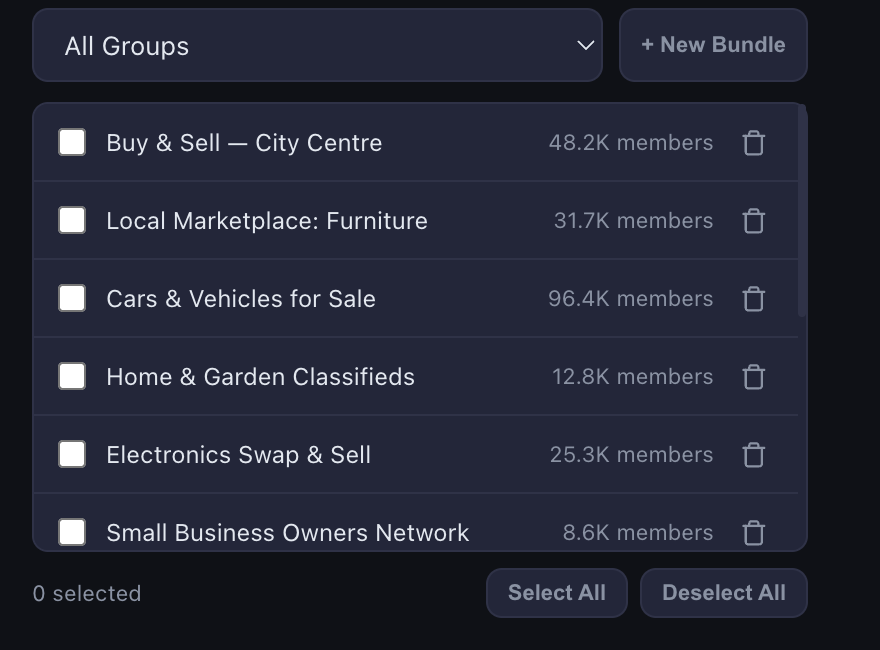
Make bundles by area. Save each town's or region's groups as a bundle, such as "North side", so next time you just pick it.
Write the listing with spintax. In the Post tab, paste your template and add photos; AutoGP varies each image slightly per group. Add an optional first comment, such as pickup times, and save the post as a template.
Preview. Click Preview and check each sample reads well, with identical price, phone number and links.
Choose a speed and start. Pick Careful, Steady or Faster for the wait between groups, choose your bundle under Post to and click Post now, then Start posting. Waits are randomized and stretch as the day's post count grows, inside an 08:00 to 23:00 window by default. Your daily limit starts careful, set from the account's age and posting history, then rises week by week to a ceiling set by account age; you can set your own limit instead. A duplicate-content guard watches for repeats.
Check the results. The Results tab shows which groups the listing reached, which attempts didn't go through, and your posting history. Unavailable groups are skipped, but if Facebook blocks the account itself, AutoGP stops the run.