The short answer: AutoGP is a Chrome extension that posts one post to dozens or a hundred Facebook groups you've joined, automatically, in one click, safely, from your own logged-in browser. It sets a daily limit from your Facebook account's age, stops the whole run the first time Facebook warns the account, gives a reason for every group a post didn't reach, and gives failed and skipped posts back to your allowance. Posting the same text quickly to many groups is what gets accounts restricted, and eight of the twelve other group posters we compared on 9 October 2026 don't say on their own pages that they stop when Facebook objects. Every tool is compared side by side in the best Facebook group posting tools.
Posting the same update to 30 Facebook groups by hand means opening each group, pasting the text, attaching the photo and pressing Post, 30 times over, and the same words going out group after group is the kind of repetitive posting Meta's spam policy names as a sign of spam.
AutoGP is a Facebook group poster built as a Chrome extension, so you can post to multiple Facebook groups at once from your own logged-in browser. You write the post once, choose from the groups you've already joined, and it posts to each one in turn, with the wording varied by spintax, a random wait between groups and a daily limit set from your account's age. It never asks for your Facebook password.
How it works
Sync the groups you're in
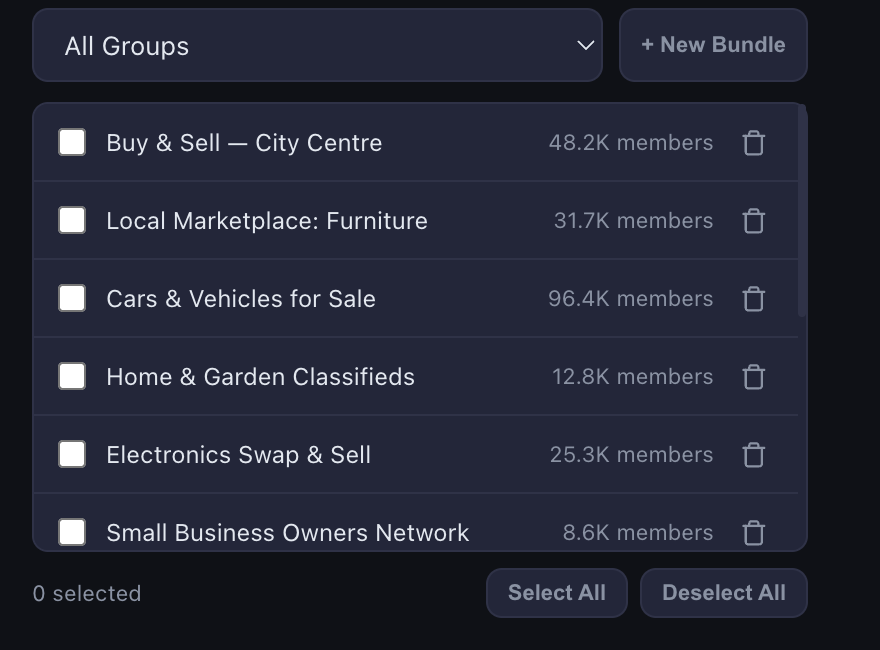
Once the extension is installed and connected to your AutoGP account, press Sync Groups. AutoGP reads the list of groups your Facebook account belongs to, including the ones where you're an ordinary member, and shows each with its member count. Syncing an account that's in several hundred groups takes a couple of minutes. You only need to sync again when you join or leave groups.
Write once, vary it with spintax
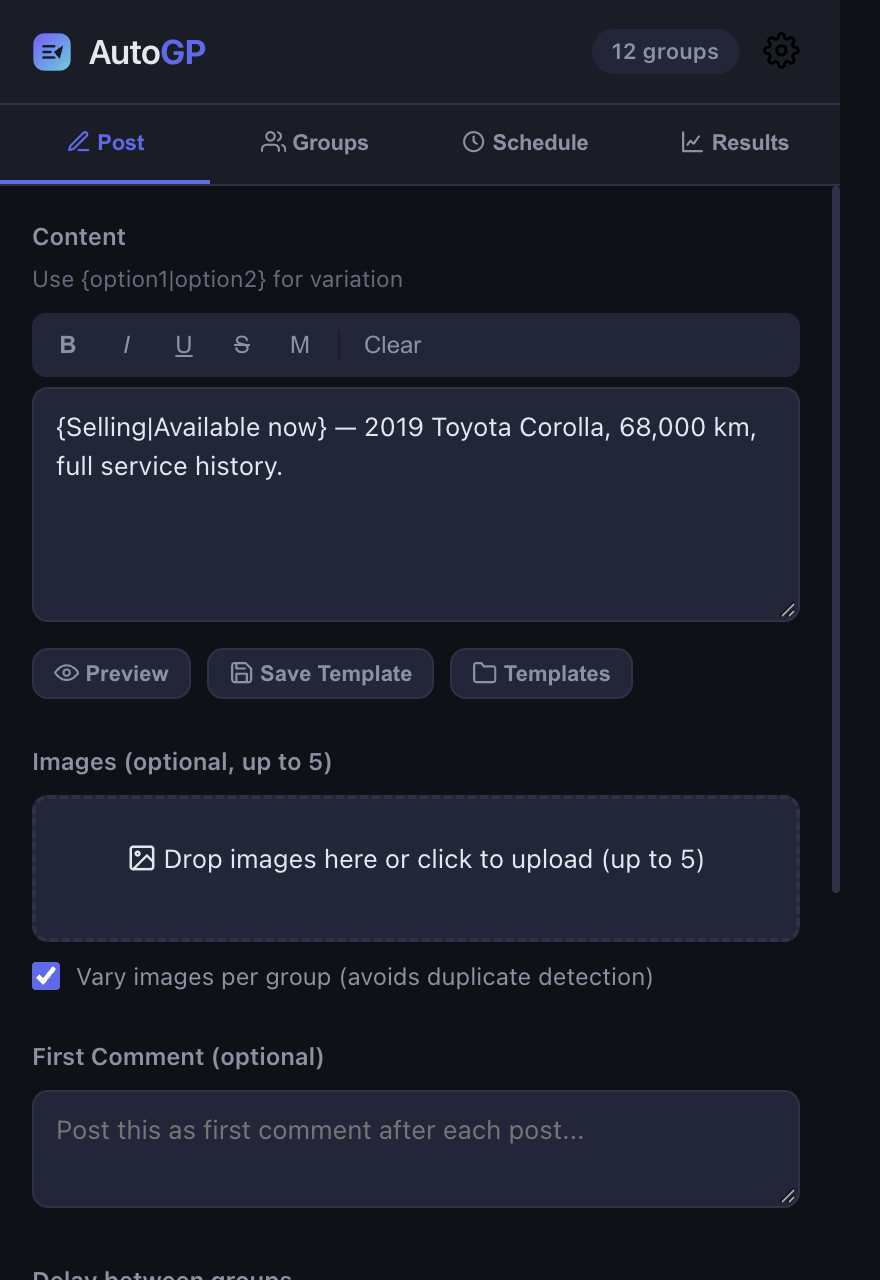
Write the post in the composer and add up to ten images if you want them. Wherever you'd like the wording to change from group to group, use spintax: a few options inside curly braces, separated by a vertical bar. {Hi|Hello|Hey} everyone becomes "Hi everyone" in one group and "Hey everyone" in the next, so 30 groups don't all get an identical post.
Preview shows sample versions before anything is sent, and Save Template keeps a post you'll want again.
Pick groups or a saved bundle and start
Tick the groups for this run, or save a set you post to often as a bundle, such as every buy-and-sell group in your area, and pick it from the list next time. Then press Post now. AutoGP opens each group in a small window in a corner of your screen, types the post into Facebook's own composer, attaches the images, presses Post and checks the post went through before moving on.
"At once" means one setup, not one instant. Posts go out one group at a time with deliberate gaps between them, so a run takes a while, and Chrome needs to stay open until it finishes. You don't have to do anything while it runs.
Why Facebook's own tools don't do this
Facebook has a few ways to get content into more than one place. None of them is built to bulk post in Facebook groups with the wording varied and the posts paced.
Share sends the identical post to every group
If you've tried to share a post to multiple Facebook groups, you've seen what Share does: it re-posts an existing post into a group you belong to. Every group gets the same post, and nothing varies the wording, spaces the shares out or keeps count of how many went out that day.
Marketplace "List in more places" only covers items for sale
Where an account has it, "List in more places" lets sellers add a Marketplace listing to buy-and-sell groups. It only works for item listings, not ordinary posts, and the option isn't available on every account.
Native scheduling only works in groups you manage
Facebook lets admins and moderators schedule posts, and set up recurring ones, in groups they manage. As an ordinary member you can't schedule a post into someone else's group, so it doesn't help with the groups you've only joined.
Third-party schedulers lost group access in 2024
Social media schedulers used to publish to groups through Meta's Groups API. On January 23, 2024, alongside Graph API v19.0, Meta announced that the Groups API was deprecated and would be removed from all versions within 90 days, together with the permission apps used to publish to groups. It was removed around April 22, 2024. Tools that post through Meta's API can no longer publish into groups for you.
AutoGP doesn't use that API. It works through your own logged-in browser and Facebook's normal post composer, one group at a time. For how the different kinds of tool compare, see our comparison of posting tools.
Built to post like a careful person
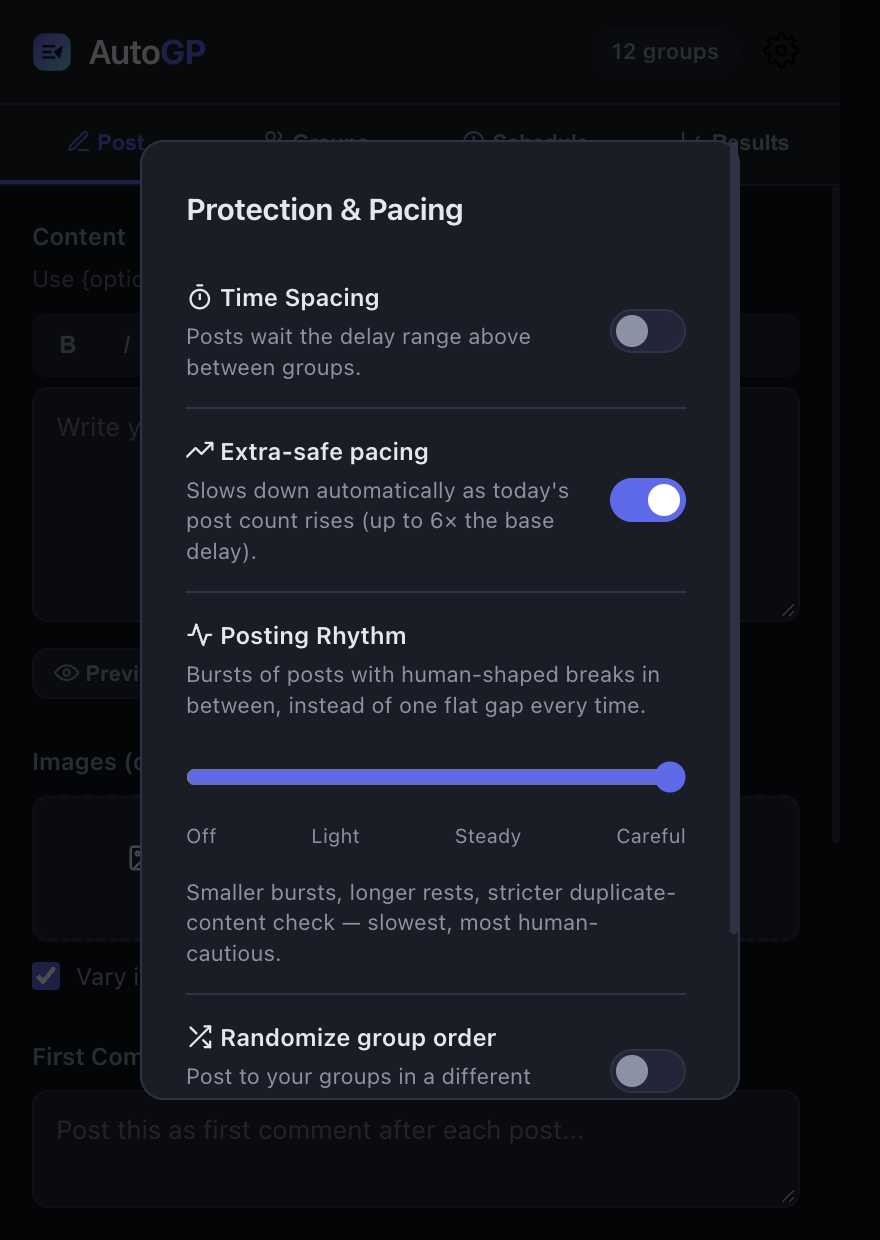
Fast, repetitive posting is what Meta's spam policy targets, so most of AutoGP is about pacing. These are its defaults, and most of them can be changed with the speed on the Post tab or in Settings, under Speed and safety.
Account warm-up
The first time you open AutoGP, it asks how old your Facebook account is and whether it has posted in groups before. From that it sets a careful starting daily limit, then raises it week by week until it reaches the ceiling for the account's age. These are AutoGP's defaults, not Facebook rules: Facebook publishes no number.
An account that has never posted in groups starts lower, and one that posts in groups regularly starts higher, but even the lowest start is a pace a new account can carry once it is spread over the day. As the account gets older, its ceiling moves up with it.
If you'd rather pick your own number, switch to a manual limit. Either way, AutoGP asks before a run would take you past the limit. There's more on the reasoning in Facebook group posting limits.
Delays that stretch as the day goes on
Between groups, AutoGP waits a random time set by the speed you choose on the Post tab, so the gaps vary: 90 to 150 seconds at Steady, the default, 4 to 6 minutes at Careful and 30 to 45 seconds at Faster, or a range of your own under Customize. With Extra-safe pacing on, which it is by default, that wait gets longer as your post count for the day climbs:
- ×1.5 once you've posted 10 times that day
- ×2.5 after 30 posts
- ×4 after 60 posts
- ×6 after 100 posts
It also takes occasional longer rests between bursts of posts, instead of keeping a steady beat.
Duplicate-content guard
AutoGP keeps a fingerprint of the text it has actually posted over the last 24 hours. If you start a run with a post that's very similar to one of those, it warns you. It's a warning, not a block, and usually a sign to add more spintax.
Knows when to stop
One group being private, unavailable or still holding your membership request is that group's problem, so AutoGP skips it, records why and carries on. If Facebook signals that the account itself is blocked, rate-limited or signed out, AutoGP stops the whole run instead of repeating a rejected action on every remaining group. If particular groups keep refusing your posts, why you can't post in some Facebook groups covers the usual causes.
Posting window
By default, AutoGP only posts between 08:00 and 23:00 in your local time, since a steady run of posts at 4 a.m. stands out. You can change the window in Settings.
What you can post
- Text, including posts with several paragraphs.
- Images, up to ten per post. With "Vary images per group" ticked, as it is by default, each group gets a copy with slight pixel-level changes, so the identical file isn't uploaded everywhere.
- Post versions and spintax, so the wording differs from group to group: write the post more than one way and groups get the versions in turn, or select words and choose Add alternatives. An emoji picker sits beside the text.
- Templates for posts you reuse.
- Group bundles, saved sets of groups you post to together, and each group's health: whether its last post went through, is waiting for approval or keeps failing.
- Post history. The Results tab shows each run group by group, with the reason for anything that didn't go through, plus running totals: posts made, groups reached, the last 30 days and the groups you post to most.
You can also add an optional first comment under each post, and schedule a run for later, including one that repeats on chosen days of the week.
Every plan has every feature, Free included: images, video, templates, group bundles, scheduling, a first comment and repeating runs, with spintax and every safety control. The paid plans differ in how many posts a month and how many Facebook accounts you post as: Pro your profile plus one Page, Business up to 3 profiles or Pages, and Agency up to 10, with a space and report for each client. The pricing page has the full table.
See how it fits buy-and-sell groups, real estate agents and recruiters.
By hand vs with AutoGP
Posting by hand works, and it costs nothing. If that's the route you want, here's the step-by-step manual method. This is how the two compare for a run of 30 groups:
| By hand | With AutoGP | |
|---|---|---|
| Your time for 30 groups | Open, paste, attach and post in every group, one by one | A few minutes to set up. The run takes a while because of the delays, but doesn't need you |
| Wording variation | You rewrite each copy yourself | Spintax varies it per group |
| Spacing between posts | Up to you to remember | A random delay per group, longer as the day's count rises |
| Tracking what went out | A spreadsheet or your memory | The Results tab, group by group |
| Daily limits by account age | You work them out | A warm-up limit from account age and group history |
| Tailoring a post to one group's rules | Easy, since you're in the group | The same post, varied by spintax, goes to every group in the run |
| Cost | Free | 25 free posts, then plans from $29/month or $229/year |
| Risk of Facebook limiting the account | Real if you post fast and repetitively | Still real, with conservative defaults |
What it costs
You get 25 free posts to try AutoGP on your own groups, with nothing charged until you go past them. It's a one-off allowance, not a monthly one. After that, paid plans start at $29 a month or $229 a year. Every plan has every posting feature and the same safety controls, Free included; the plans differ in how many posts a month and how many Facebook accounts. Full details are on the pricing page, and AutoGP's facts page puts prices, plan limits and pacing defaults together on one dated page.
The honest part
AutoGP is an independent tool and isn't affiliated with or endorsed by Meta or Facebook. Any tool that auto posts to Facebook groups carries a risk that Facebook limits or restricts the account it's used with, and no software can take that risk away. AutoGP's defaults are deliberately conservative, but how much and how fast you post is your decision. Before you start, read whether auto-posting to Facebook groups is safe and the Facebook risk section of our terms.