Works with groups you have joined, not just ones you admin
Post to 100+ Facebook groups in one click, safely.
AutoGP is a Facebook group poster: write one post, pick the groups you have joined, and click once. It posts it to every group for you, one after another, from your own Chrome. It's built safety-first: a daily limit set from your account's age, different wording and a pause for every group, and if Facebook objects, the whole run stops and the account rests for a day.
Free Chrome extension · start with 25 free posts
- Runs in your own Chrome
- Never asks for your Facebook password
- Cancel any time
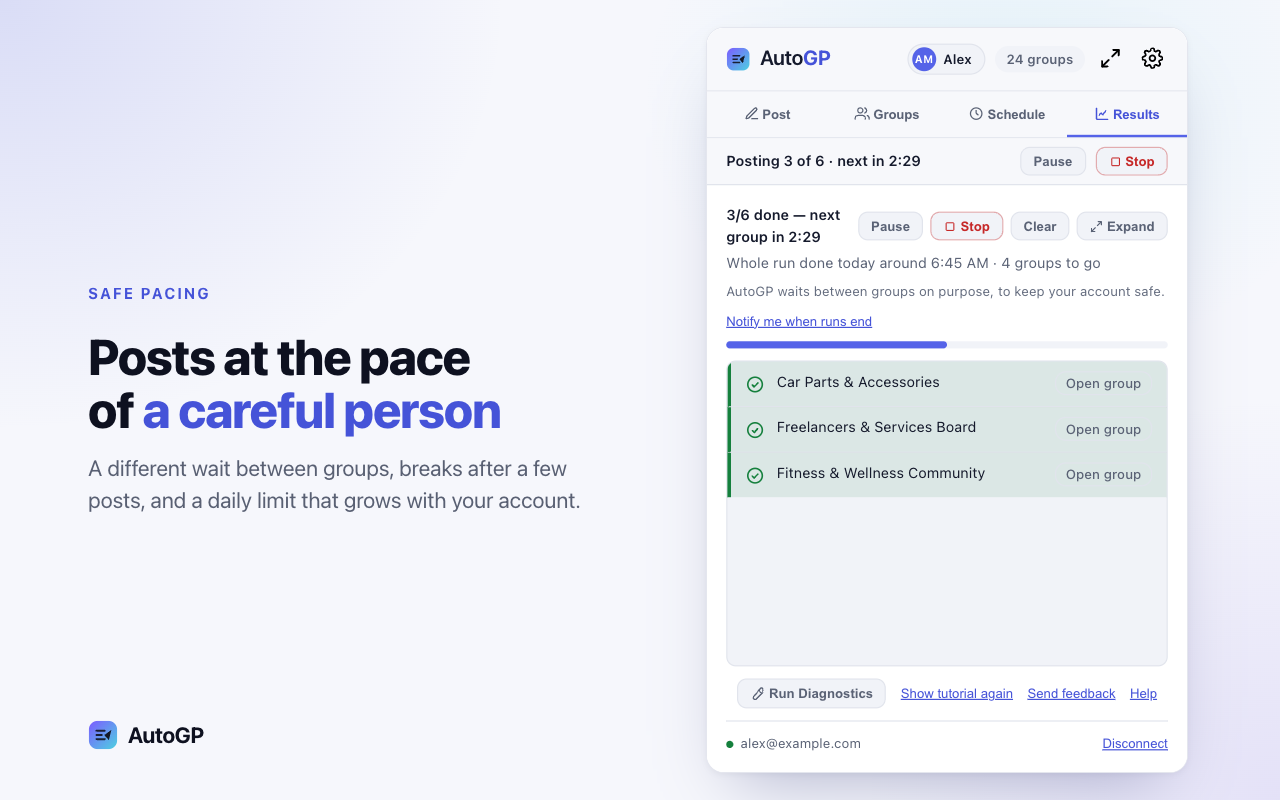
AutoGP waits between groups on purpose, to keep your account safe.
Why AutoGP
Posting to 40 groups by hand takes more than an hour
And pasting the same text into every group is the kind of repetition Facebook’s spam rules are written against.
By hand
- Open each group, paste the text and attach the photos again
- About two minutes a group, so 40 groups take more than an hour
- The same words in every group, which reads as spam
- Nothing keeps count, so a young account is easy to overdo
- No record of which groups took the post and which refused it
With AutoGP
- Write the post once, pick groups or a saved bundle, and start
- Spintax gives each group its own wording, and images vary slightly
- Random delays, and a daily limit set by your account’s age
- Stops the whole run if Facebook blocks or signs out the account
- Results list every group, with links and the reason for any miss
How it works
From install to your first post in about 3 minutes
No code to copy between tabs, and the safe defaults are already on.
37 seconds · titles on screen and music · sample groups and example data
What the video shows
- 1Now you can post to all your Facebook groups at once. The groups you have joined come into AutoGP: 24 groups found.
- 2Write your post once. With photos and videos.
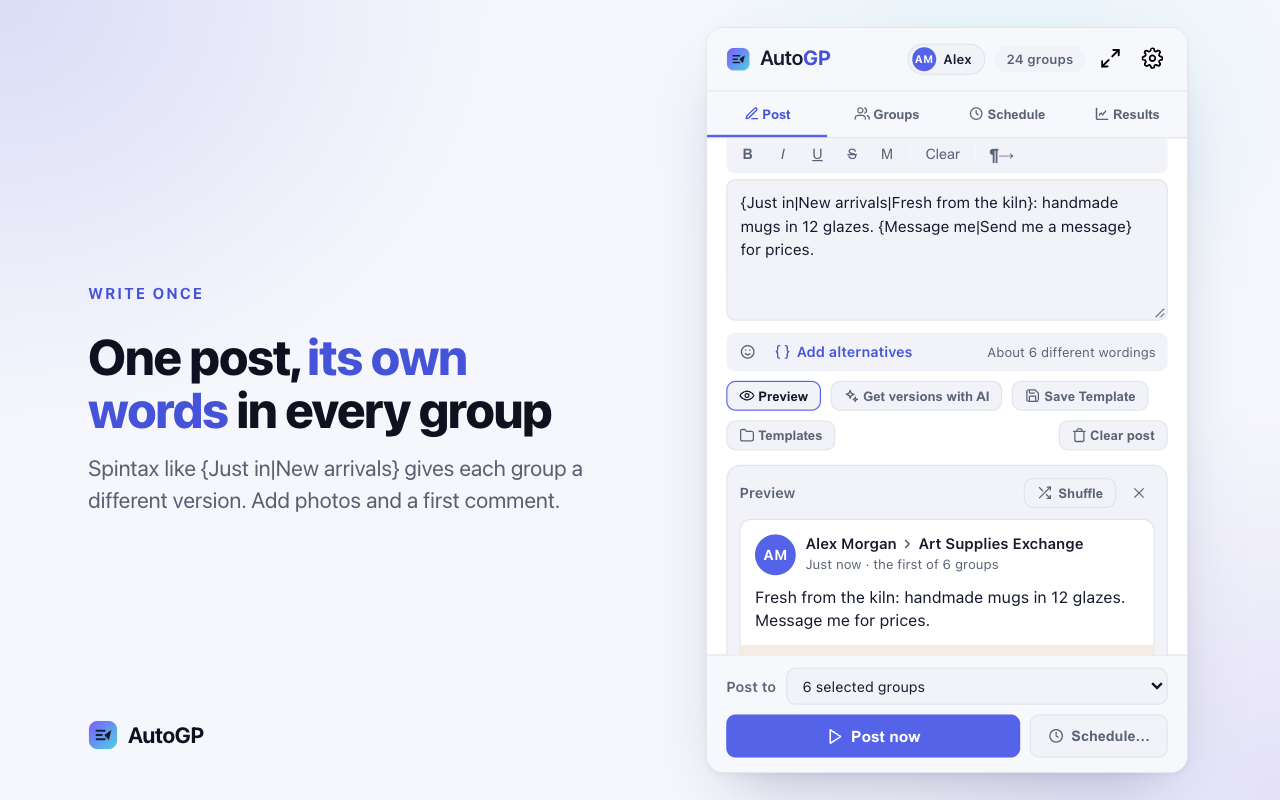
- 3Fresh wording for each group. About six different wordings of the same post, A, B and C.
- 4Pick all your groups, or create bundles. Select all, or save groups as a bundle to use again.
- 5Advertise to millions of members, combined. 3M members across the example groups.
- 6Post in one click. Check what goes out, then start posting.
- 7Group by group, at a safe pace. AutoGP waits between groups on purpose. (The run is sped up in the video.)
- 8Build campaigns. Schedule them. Several posts, each to its own groups, in one run (Business plan).
- 9See where every post went. Post analytics: 1,061 posts made and 24 groups reached in 30 days (example data).
- 10Automatic marketing. No ad budget. 42 posts today, and the run carries on by itself (example data).
- 11Warm-up process for new Facebook accounts. The daily limit grows as a new account warms up.
- 12One post. All your Facebook groups. autogp.ai · Sign up now.
Step 1
Create your free account
About a minute. Your 25 free posts are ready as soon as you are in.
Step 2
Add the Chrome extension
Install it from your dashboard. It connects to your account by itself, with nothing to copy.
Step 3
Sync groups, write one post
AutoGP reads the groups you have joined. Add spintax, images and a first comment if you like.
Step 4
Pick groups and start
Choose groups or a bundle and start the run. Results fill in as each group is posted.
Features
Built to post the way a careful person would
Pacing and protection are on from the first run. Every setting can be changed, and the choice stays yours.
Warm-up pace
A daily limit that grows with your account
When you start, AutoGP asks how old your Facebook account is and whether it has posted in groups before. A new account starts at a careful limit, spaced out, and an older one a little higher. The limit then rises week by week, up to a ceiling for the account’s age.
- Careful, Steady or Faster: random waits that stretch as the day’s posts add up
- Posting hours, 08:00 to 23:00 by default
- Your own daily limit instead, if you prefer
Stops on warnings
One bad group is skipped. A warning stops the run.
A private group, a pending membership or a group that won’t take the post is that group’s problem, so AutoGP notes why and moves on. When Facebook blocks, rate-limits or signs out the account itself, the whole run stops instead of trying the next group.
- Posts waiting for admin approval count as sent
- Retry posting ticks the groups that failed
- A duplicate guard warns before you repeat a recent post
Versions and spintax
Every group gets its own wording
Write the post a few different ways and groups get the versions in turn. Inside a version, select a few words and choose Add alternatives, or type {Hi|Hello|Hey}, and AutoGP picks one option for each group. An emoji picker sits beside the text, Preview shows samples before anything is posted, and each image is varied slightly for every group, so no two copies match.
- Up to 10 images per post
- Templates for the posts you send often
- Anything outside the braces, like prices and links, stays the same
Scheduling
Schedule a post, or repeat it on chosen days
Pick a date and time, or repeat a post on chosen days of the week, such as every Friday and Saturday morning. Each scheduled post keeps its own text, groups, images and first comment, gets the same safety check as a run you start yourself, and can be changed later with Edit post.
- Repeats every day, on chosen days of the week or every few days
- Runs while Chrome is open
- A log of what ran and what did not
Groups, bundles and health
Sync every group you’ve joined in one pass, with member counts. Save the ones you post to together as a bundle, and see each group’s health: posted, waiting for approval or failing.
First comment
Add a first comment under every post, like pickup times, or a link where the group allows links.
Posting as
See which Facebook profile a run will post as. Switch profiles and AutoGP offers to sync that account’s groups.
In the side panel
AutoGP opens beside your tabs in Chrome’s side panel, or full screen when you want more room.
Pricing
Try it on 25 posts. Then pick how much you post.
Every plan has every feature, Free included, so your free posts try the whole product, and nothing is charged during them.
Free
$0
25 posts in total.
- Every feature, with the same safety defaults
- Sign up, install, and it pairs itself
- Then pick a plan when you want more
Pro
For most sellers$229/year
$19.08 a month, billed yearly. Save $119.
- Up to 970 posts a month
- One Facebook account: your profile plus one Page
- Every feature, with the same safety defaults
7-day money-back guarantee on your first payment.
Business
For busy sellers$379/year
$31.58 a month, billed yearly. Save $209.
- Up to 5,000 posts a month
- Up to 3 Facebook profiles or Pages
- Every feature, with the same safety defaults
7-day money-back guarantee on your first payment.
Agency
For agencies$929/year
$77.42 a month, billed yearly. Save $499.
- No monthly post limit
- Up to 10 Facebook profiles or Pages, clients' included
- Every feature, plus client spaces and per-client reports
7-day money-back guarantee on your first payment.
A Facebook account is each profile or Page AutoGP posts as, counted per billing month. Pro posts as your profile plus one Page; Business as up to 3 profiles or Pages in any mix, and Agency as up to 10, and more if you email support@autogp.ai. Every account keeps its own daily safety pace.
Prices in US dollars. See full pricing
Use cases
Made for anyone who posts to many groups
Each page covers the groups, rules and posts that work for that kind of seller.
Buy and sell groups
One listing to every local buy and sell group you belong to, not one group at a time.
Read moreReal estate agents
Listings and open houses to local community and property groups, with compliant wording.
Read moreRecruiters
Open roles to city and industry job groups, with clear apply steps.
Read moreE-commerce sellers
Products, launches and offers in the niche groups that allow promotion.
Read moreLocal services
Your service in the neighborhood groups where people ask for recommendations.
Read moreEvents and classes
Announcements, reminders and last calls to the groups your attendees are in.
Read more
Guides
Read before you post
What gets accounts restricted, and how many posts a day is sensible.
- How to post in multiple groups on Facebook
- Facebook group posting limits: how many posts are safe?
- Is auto-posting to Facebook groups safe?
- Why can’t I post in Facebook groups?
Comparing tools? See the best Facebook group posting tools, side by side, or AutoGP’s prices, limits and safety on one page.
Questions
Questions people ask first
Is there a Chrome extension that posts to all my Facebook groups?+
Yes, AutoGP is one. It posts one post to the groups you’ve joined, admin or not, one group at a time from your own signed-in Chrome, with a pause between groups.
Do you ever see or store my Facebook password?+
No, and we have no way to get it. AutoGP works inside the Chrome session you are already signed in with, the same as you clicking Post yourself.
Can it post to groups I don’t admin?+
Yes. AutoGP posts to groups you are a member of, following each group’s own rules — including admin approval where a group requires it. Facebook’s native scheduling only works in groups you admin.
Can I schedule posts in groups where I’m not an admin?+
Yes. Pick the groups you’ve joined and set a time, or a run that repeats on chosen days; scheduling is on every plan, Free included. Facebook’s own scheduling only works in groups you admin, and Chrome needs to be open when the posts go out.
Does Chrome have to stay open?+
Yes, while posts go out. AutoGP runs inside your own Chrome, signed in as you, so it never needs your Facebook password and nothing posts from a stranger's server. Leave Chrome open during a run or a scheduled post.
How many groups can I post to per day?+
Facebook publishes no fixed number. AutoGP sets a starting limit from your account’s age and group history and raises it gradually; you can set your own limit instead.
Is it safe to use a Facebook group auto poster?+
A careful one lowers the risk, but no tool can remove it. AutoGP’s daily limit starts careful and grows with your account, it waits between groups and varies the wording, and it stops at Facebook’s first warning, then rests the account for 24 hours.
What does it cost?+
25 free posts to try it, with every feature and nothing charged during them. After that, pick a plan if you want to keep going. The plans: Pro at $29 a month or $229 a year for up to 970 posts a month from your profile plus one Page, Business at $49 a month or $379 a year for up to 5,000 from up to 3 Facebook profiles or Pages, or Agency at $119 a month or $929 a year with no monthly post limit, for up to 10 profiles or Pages and with client spaces. Every plan has every feature. Cancel any time from your dashboard.
Is this against Facebook’s rules?+
Facebook’s terms restrict automated access, and its spam rules target very frequent or repetitive posting whether it is done by hand or by a tool. There is real risk, and AutoGP’s defaults are built to be conservative — but the volume is your decision.
More in the help pages and the terms.
Your next post, in every group you have joined
Create your account, add the extension, and it pairs itself. Try it on your own groups with 25 free posts.
Free Chrome extension · start with 25 free posts
First commentPickup in Maple Heights, weekday evenings or Saturday.