Your buyers are already in Facebook groups, sorted by what they care about: sourdough bakers, fly fishers, quilters, aquarium keepers. A post in the right group puts a product in front of people who already want what it does, and posting costs nothing.
The catch is that every group writes its own rules. One takes shop posts only on Saturdays, another only as comments on a weekly thread, another bans links, another bans selling. Pasting a launch post into 30 groups by hand is slow, and the same text in every group is the kind of repetition Meta's spam policy treats as an indicator of spam.
This page covers how to sell products on Facebook groups from a Shopify, Etsy, WooCommerce or other online store. Selling a single item locally instead? See posting to buy and sell groups.
Where buyers for your products gather
Member count matters less than whether members buy what you sell.
Hobby and interest groups
A proofing basket shop belongs in sourdough groups, a tackle store in fly fishing groups. A relevant product can be welcome there, but many of these groups limit sellers to a promo day or ban them.
Shop-small and handmade groups
These exist for shop posts, often with a weekly promo day, but many members are sellers promoting their own shops. Keep a group where buyers comment and ask questions; skip one where promos sit unanswered.
Owners' groups for a product you complement
Cases for one camera, presser feet for a sewing machine brand, filament for a 3D printer: owners' groups fit if they accept accessory sellers. Never imply you're the brand; Meta's intellectual property policy covers false affiliation with a brand.
Promo days, threads and link rules
Before adding a group to a bundle, check its rules for:
- Where promotion goes. Anywhere in the feed, in the feed on one day, or only as a comment on the admins' weekly thread. AutoGP publishes ordinary group posts, not comments on someone else's thread, so post in thread-only groups by hand.
- Links. In the post, in comments only, or not at all. Admins can set Admin Assist to decline posts with a link, or with links to specific sites (Social Media Examiner), so a post with your store URL may never appear.
- Who can sell. Some groups take makers but not resellers or dropshippers, or allow products but not prices.
- How often. Such as once a week per shop.
Then bundle groups by what they allow, such as "Links in comments" or "Saturday promo", so one version of a post fits every group in the bundle.
Meta's rules for shop posts
Meta's Community Standards apply to all types of content, group posts included. Two of its policies matter most to online sellers.
Spam
The spam policy targets content designed to deceive, mislead or overwhelm people in order to artificially increase viewership. For a shop, that means:
- Volume and repetition. It covers posting at very high frequencies, manually or automatically, and allows restrictions at lower frequencies when there are other signs such as repetitive content.
- Links. Deceptive or misleading URLs are prohibited, including cloaking and redirects that make people complete an action, such as a captcha, and then change domain. Link to the page your post describes.
- Paid posting. Selling, buying or exchanging permission to post in specific spaces is prohibited, and so is exchanging content for something of monetary value unless it's clearly identified branded content.
Intellectual property
Meta removes or restricts content when a rights holder reports copyright or trademark infringement or counterfeits, and acts against accounts that repeatedly break its intellectual property policy. That puts print-on-demand designs using unlicensed characters, logos or band names at risk, along with product photos copied from a supplier's or another store's listing.
Commerce Policies
If you also sell on Marketplace or through Shops, Meta's Commerce Policies apply to that commerce content, meaning any attempt to buy, sell or trade products. Among other things, they prohibit:
- downloadable digital content, digital subscriptions and digital accounts, such as printables and patterns
- medical and healthcare products, including medical devices and ingestible supplements
- counterfeits, such as goods that copy another company's name, logo or distinctive features
- misleading products and offers
Value first: a shop post that fits the group
Members joined for the hobby, not your catalog, so lead with something useful and let the product follow:
- Something for the group: a tip, a fix or what's new.
- The product, plainly: what it is, one detail that matters, the price, and honest delivery times if orders ship from abroad.
- The offer, once: the discount, code and end date.
- One next step: the link where it's allowed, or "link in the first comment".
Here's a restock post for sourdough groups. In AutoGP, spintax like {option one|option two} picks one option at random for each group; keep sets one level deep.
{Loaves spreading flat before they bake?|Dough spreading out while it proofs?} {Try proofing in a basket dusted with rice flour|A basket dusted with rice flour helps}: {it holds the shape and releases the dough cleanly|the dough keeps its shape and comes out cleanly}.

{Our 9-inch rattan proofing baskets are back in stock|We've restocked our 9-inch rattan proofing baskets}. $24 each, and code BREAD15 takes 15% off until Sunday, September 20.

{Link in the first comment.|The shop link is in the first comment.}
One version it can produce:
Dough spreading out while it proofs? A basket dusted with rice flour helps: it holds the shape and releases the dough cleanly.

We've restocked our 9-inch rattan proofing baskets. $24 each, and code BREAD15 takes 15% off until Sunday, September 20.

The shop link is in the first comment.
The price, code, end date and link stay outside the braces, so every group sees the same offer. There's more in spintax for Facebook groups.
Product photos
- Lead with the product in use, such as the basket beside a finished loaf, then add a close-up that shows size or material.
- Use images you made or have the rights to. A rights holder's report can get the post removed.
When to post launches, restocks and offers
- Launch: schedule the post for after the product page is live, and for each group's promo day if it has one.
- Restock: post when something people asked for is back, and name it.
- Dated offer: post when it starts, and add a reminder near the end only where a group allows a second post. Don't put it on a repeating schedule: a repeat sends the same saved post, expired code included.
- Promo days: write a fresh post each week rather than resending last week's.
- Daily total: build volume over weeks. Facebook group posting limits has realistic numbers by account age.
Mistakes that cost shop owners
- The same launch post everywhere within the hour. Members of one niche group may belong to several others and see every copy. Vary the wording and let the run spread out.
- "Comment SHOP for the link." Meta's engagement bait guideline covers posts that explicitly request comments, shares, tags or reactions for purposes other than a specific call to action (its examples include raising money and sharing a petition), and Meta reduces the distribution of engagement bait in Feed. Put the link where the rules allow instead.
- Posting as your own customer. In the US, the FTC's final rule on fake reviews and testimonials covers testimonials from people who don't exist or never used the product, and certain insider testimonials that don't clearly disclose the connection to the business. This is general information, not legal advice.
Doing it with AutoGP, step by step
AutoGP is a Chrome extension, opened as a side panel and paired with an autogp.ai account, that posts to groups you already belong to as ordinary group posts, through your own logged-in Chrome session. It never asks for or stores your Facebook password, and Chrome must stay open while it posts. AutoGP is independent and not affiliated with Meta. After 9 free posts (a one-off allowance, no card), it's $27 a month or $197 a year in the US, Canada, the UK and the EU, less in many other countries, and you can cancel any time (pricing).
Sync your groups. In the Groups tab, click Sync Groups. A progress bar tracks the sync; then search the list and check member counts.
Save bundles by rule. Tick the groups that share a rule, click Save as Bundle and name it. Leave thread-only groups out.
Write the post. In the Post tab, write it under Content with spintax, add up to 5 photos with Vary images per group ticked, and put the store link in First Comment (optional) for groups that want links there. Save Template keeps the text, not the photos.
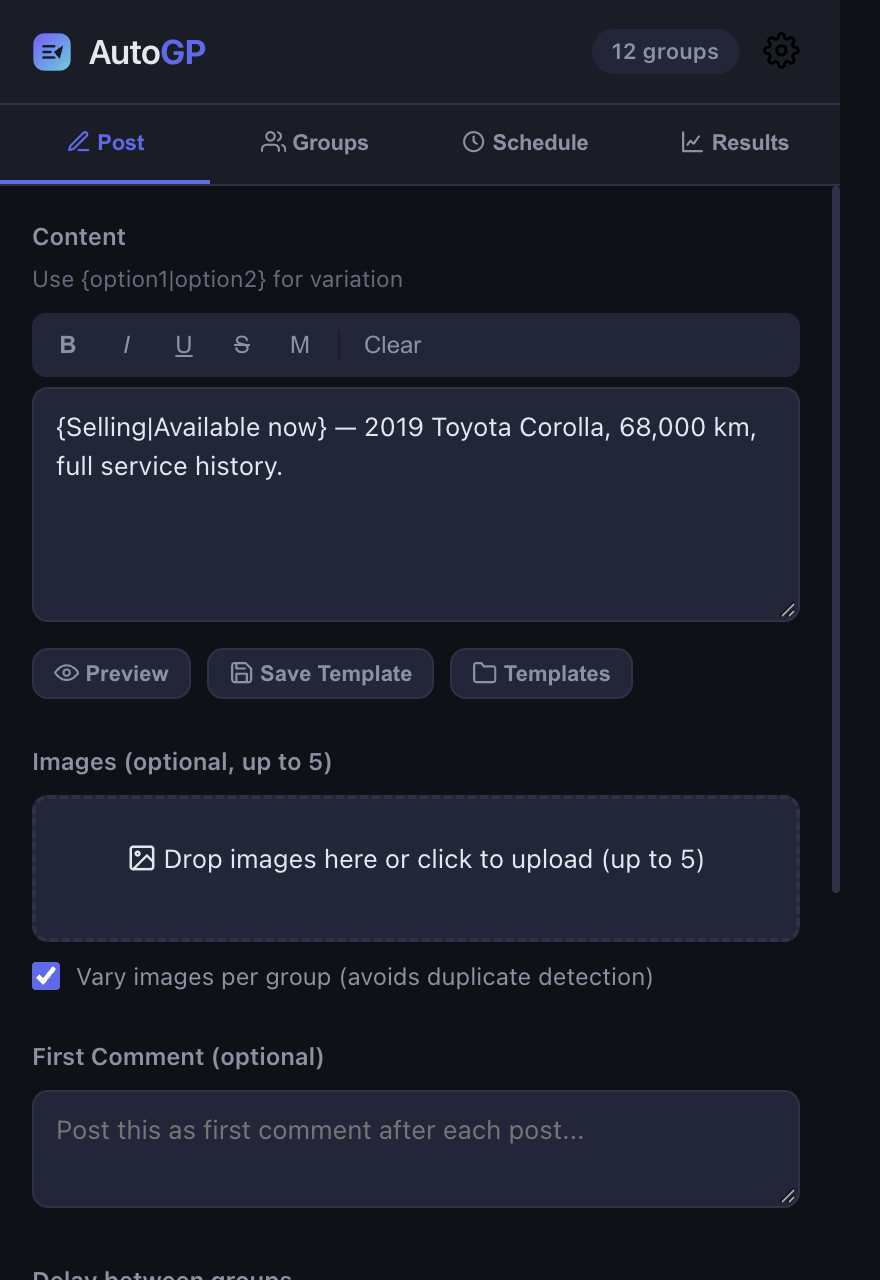
Preview. Click Preview and check that the price, code, end date and link match in every sample version.
Check the profile and start. Posting as shows which Facebook profile the run will post as. Pick the bundle under Post to, set Delay between groups and click Start Posting; a protection check runs first. Your daily limit starts at about 5 posts for a new account or 30 for one over two years old, adjusted for group history, and rises about 30% a week to a ceiling set by the account's age, from 20 to 90 a day, unless you set your own. Delays are randomized and stretch as the day's count grows, group order is random, posting stays within 08:00 to 23:00 in your timezone by default, and a duplicate-content guard warns when a post is too close to a recent one.
Or schedule the launch. In the Schedule tab, pick the date and time and click Schedule Post; it uses the post, images and groups set on the Post tab. Chrome must be open at the scheduled time. Keep Repeat every for posts without dates or codes.
Check the results. The Results tab shows which groups the post reached, with links, which attempts didn't go through and why, and a countdown to the next group. Posts held for admin approval count as submitted. A private group, a pending membership or a group that won't take the post is skipped, but a block, rate limit or sign-out from Facebook stops the whole run. Select to retry ticks the failed groups, and Copy links copies their links so you can check each group's rules.